Lakhs and Crores in a spreadsheet

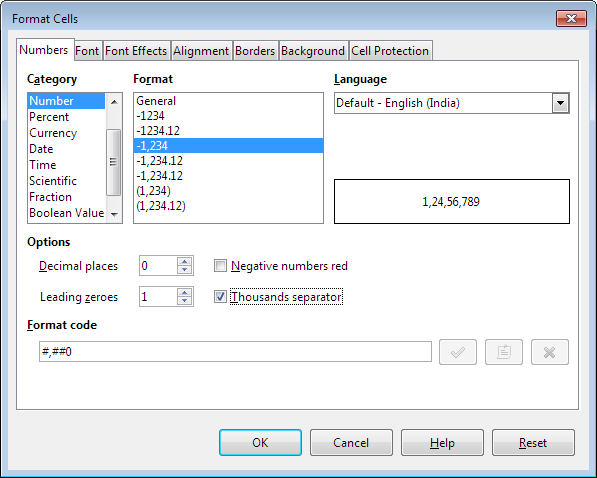
Since I exclusively use Libre Office, I had very little hope that this would work for me but it does without a hitch! I was able to create a number format that shows up as 12,34,56,789.00 instead of the western 123,456,789.00. The trick is to use a conditional format. On my system I’ve called it Indian Currency although I understand it’s also used in Thailand:
--
[>=10000000]##,##,##,##0.00;[>=100000]##,##,##0.00;##,##0.00
--
Go to: David McRitchie’s Excel Pages :: Scroll down to format #37

If you’re an Excel user, you might want to look at this add-in which has additional features:
http://www.dq.winsila.com/tips-tricks/an-excel-addin-to-show-currency-in-indian-format-and-words.html

Edit | 24th July 2014

  1. The link to the addon for Excel is broken
  2. In LibreOffice Calc (or any Open Office derivatives for that matter) when you format the number or currency, set your language to English (India) and you will automatically get lakhs and crores in your spreadsheetClipboarder.2014.07.24-006.

Everlasting Bulb

Scientists at a British company, Ceravision, have developed an alternative light bulb which has an energy efficiency of 50% (compared to 5% for incandescents and 15% for fluorescent tubes). As if that’s not enough, this bulb should last for decades and doesn’t contain mercury either. I can’t say I fully understand the technicalities but it involves microwaves being pushed through a hole in a piece of aluminium oxide. In theory this “everlasting bulb” looks like an excellent development but, eventually, it boils down to how many lumens it gives per watt of power consumed.

Go to: Everlasting light via: TreeHugger

MaPZone

Here is a freeware tool to create an unlimited number of seamless, high-resolution (or low-res if you like) textures and texture maps. It’s rather a steep learning curve but considering that there’s no cost attached, it’s well worth checking to see if it works for you.

Download: ~21 Megabytes

Go to: http://www.mapzoneeditor.com/ [LINK BROKEN]

JMSware

Two tiny programs on this site are excellent for people who have loads of AutoCAD/IntelliCAD drawings on their systems. Sometimes you just want a preview before you open a large file – and the shell extension here works like a charm. Just right-click on the file in windows explorer and a thumbnail pops up in the context menu. There is also a stand-alone dwg explorer that works equally well. Have a look at both screenshots on the website. The downloads are less than 90kb each.

Go to: http://www.jmsware.com/

Edit | 24th July 2014
Unfortunately, the link is broken