Q10 – Text Editor with Spell Check

I never thought I’d actually like a software that has a full black screen with yellow text. Reminds me too much of the bad old DOS days. And yet, there’s something about Q10 that makes me want to use it more and more. Maybe it’s the simplicity, maybe there is less strain on my eyes. Either way, it’s a keeper.
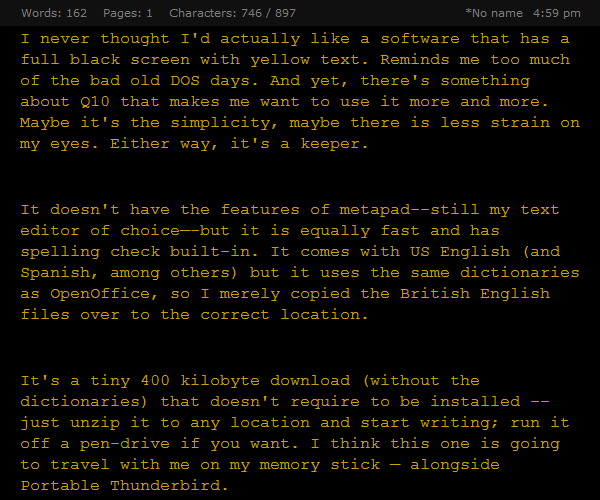
Q10 is a distraction-free text editor

Screenshot of Q10

It doesn’t have the features of metapad – still my text editor of choice – but it is equally fast and has spelling check built-in. It comes with US English (and Spanish, among others) but since it uses the same dictionaries as OpenOffice, so I merely copied the British English files over to the correct location. And I also found a dozen or more spelling errors on this site…

It’s a tiny 400 kilobyte download (without the dictionaries) that doesn’t require to be installed – just unzip it to any location and start writing; run it off a pen-drive if you want. I think this one is going to travel with me on my cellphone; alongside Portable Thunderbird.

It’s semi-crashed on me a couple of times during spell-check – usually after it has encountered an apostrophe.

Go to :: Q10

Major Site Update

It’s been ages since I started making changes to this site and finally, there is visible progress. Almost nothing of the old site remains apart from the Vastu Book and the now-slightly-outdated workshops.  The design area has been revamped and a new section has been added on sustainability. Both still need a little fleshing out but the basic framework is in place and future updates should be simpler. The old resources page has been removed and the internal search engine been revamped.

All this has only been possible because the rains have stalled work on both the bungalows at Nasrapur. I’ve finished just in time as it turns out because the monsoon is receding and I’ll be busy all over again.

Energy Design Tools for Architects

UCLA has recently released a new version of a free software called HEED that helps architects in designing energy efficient homes. This supersedes “Solar” which I had tried a few years ago and been totally befuddled by. I’ve just given HEED a spin after downloading the climate data for Bombay (Mumbai) from the EnergyPlus site and I will need time to fiddle with it before I can really make good use of it. However, I can say, even now, that it’s worth getting the hang of. If only it would give us more options for, say, materials and take graphical input from 3D dxf files instead of the primitive graph-paper-like drawing window… That would really make it a killer app.

Another useful tool from the same source is Climate Consultant v.3 – also recently released – which takes raw data (the same as used by HEED) and displays it as charts and graphs. Architects keen on improving the energy efficiency of their designs must try both of them. It may look daunting at first and the choices within HEED are somewhat limited but it still gives a good overall picture.

Go to :: Free Energy Design Tools